

Global Positioning System or more popularly called GPS is among the marvels of technology which find its application in all parts of our lives. It has enhanced our user experience and interaction with tech as GPS allows us to track routes, take and drop off rides, and allow food drivers to find their way through the streets easily. It has also allowed the user to play location-based AR games easily.
However, it has some setbacks since you have to allow the GPS app to pinpoint your location exactly. Sometimes, we want to fake our locations, prevent apps from tracking without our consent, use fake locations while browsing the internet or playing games online, etc.
Hence, we can rely on MobiGo- Location Spoofer in situations like these. The application will allow you to change your GPS location to any fake destination or place anywhere around the globe. It lets you manually choose any location.
Sounds fascinating right? Let’s dig deeper.
What exactly is MobiGo?
Mobi-Go location Spoofer will let you teleport your GPS location to anywhere with a few simple taps, and the best part is that you don’t have to jailbreak your iOS Device. Playing AR games (Location-based) like Pokémon Go is now possible without ever leaving your house. It will also let you share your location via dating, social, or travel apps; through this tool, you can bypass regional restrictions.
How to use MobiGo?
MobiGo is straightforward to use, and you only need a little prior experience with apps to operate it successfully. You have to download the app first and install the tool on your Windows PC or Mac, and it’s compatible with both platforms.
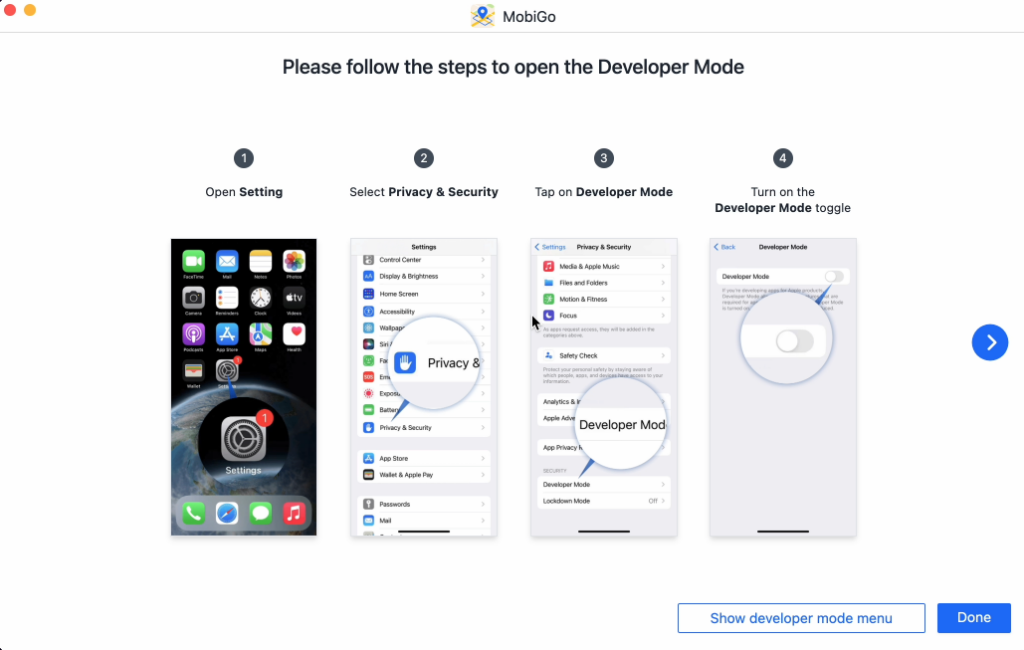
Once you successfully set it up, you can open the app and connect your iOS device. It will then guide you on enabling the developer’s mode on the device, which is required for the impeccable working of the tool.
In the next window, you will find your current location on the map along with various modes displayed at the top right corner, including the teleport mode that lets you select any particular destination. The next is the one-stop mode which lets you stimulate a particular route between various points. Finally, we also have a multi-stop mode which is useful if you want to visit various locations along a route. You can also change your location through the joystick placed at the bottom left of your screen.
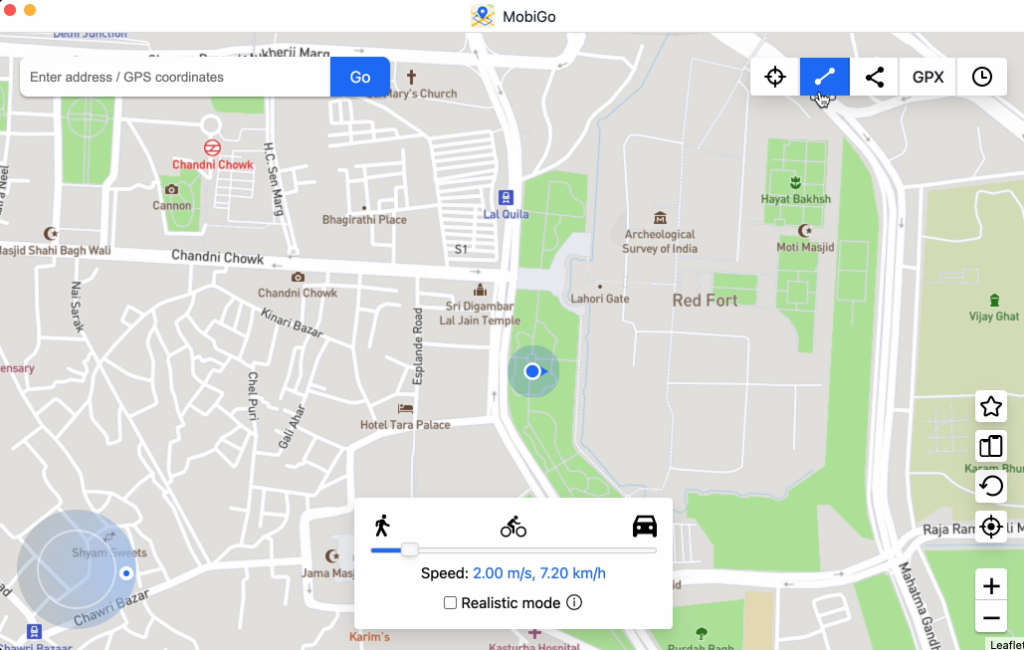
To start the teleport mode, tap on the first icon from the top right corner and enter your desired destination. Once you begin typing, the app will suggest all the available locations; after choosing it, you can Click GO.
The final step is a popup card on the map inside the destination. You can click on the Move Here button to teleport it. That’s all, as the few minutes will let you mock your location impeccably.
Stimulate Movements
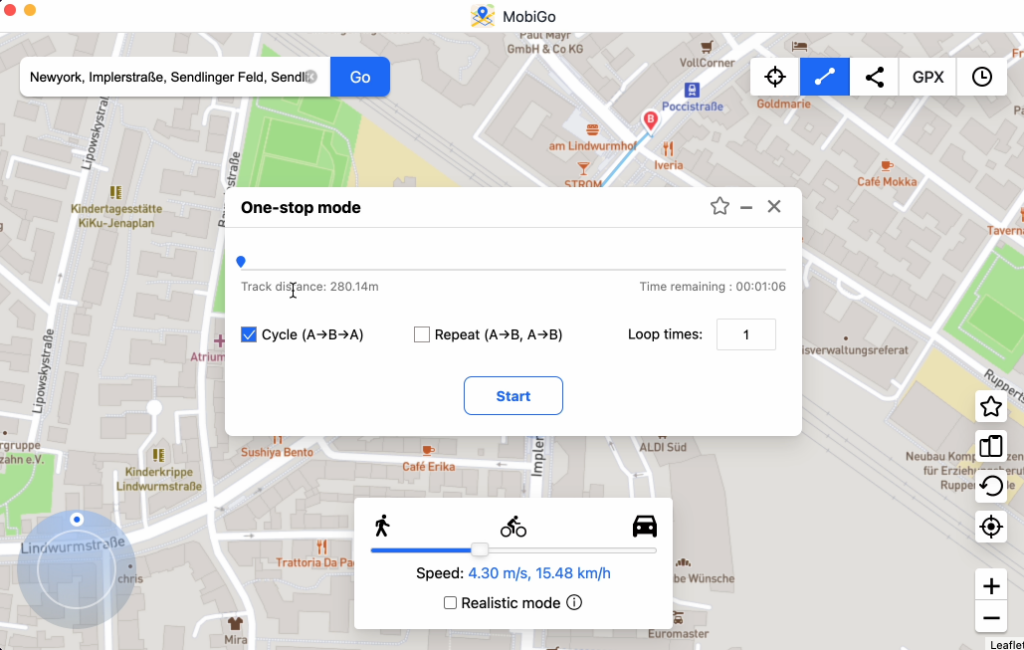
We often want to stimulate movements instead of static motion; this tool will have you covered in that regard as well. It will let you select your start and finish point along with the travel modes. The software will allow you to stimulate the GPS movements on your iOS device legitimately. You can also select the number of times your GPS should fake the traveling route between two particular points, which is a unique feature.
Going a step further than simply faking movements, the app will let you stimulate traveling speed. You can select between various speeds present on the tool. It lets you accurately counterfeit GPS location as if traveling in real life.
Compatibility
One of the best features of MobiGo – Location Spoofer is its compatibility with nearly all the apps or services which utilize GPS location. It will operate with all the location-based AR games and apps without hassle. The advanced AI will ensure that the apps cannot find the exact location or detect the fake GPS and work impeccably as if you were performing real-life actions.
Pricing
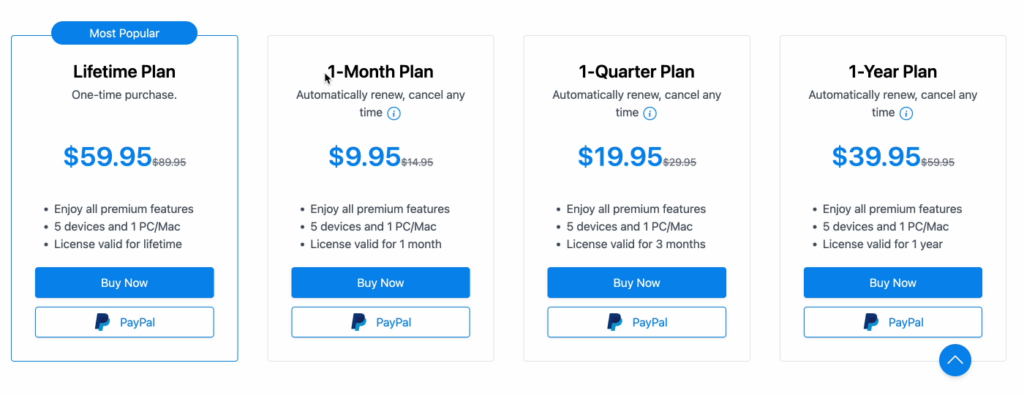
MobiGo- Location Spoofer has a subscription-based model and offers three types of subscriptions: annually, quarterly, and monthly.
The annual plan is available at $39.95, while the quarterly will cost you around $19.95, and the monthly one is $9.95. If you truly like the app and want to use it long-term, you can opt for the lifetime plan, which is available for $59.95. These plans will let you use the application for up to 5 devices and 1 PC.
Availability
The app is available for both Mac and Windows. Although, there can’t be cross-functionality between the two popular platforms as a license for each will be different.
Conclusion
MobiGo- Location Spoofer is one of the best apps to spoof or fake your location without jailbreaking your iOS device. It provides several tools to offer an impeccable user experience and has excellent privacy measures, making it nearly impossible to detect.